On-Call Without the Desk
There is a particular kind of anxiety that comes with being a DevOps engineer. Not the kind from outages or failed deployments, though those are present too. The quieter kind. The background hum of knowing that something could break at any moment and that when it does, people will be waiting for you to fix it.
The standard assumption baked into that responsibility is that you will be at your desk. That you have a terminal open, or can get one open quickly. That your laptop is somewhere nearby, that you can SSH into things, run commands, check logs, and do the actual work.
Most of the time that is true. And then sometimes you are on a commute, or standing in a queue, or halfway through a trip with your laptop sitting at home, and a notification arrives telling you something is down.
That is the problem I was actually trying to solve. Not “how do I automate Kubernetes operations” in the abstract sense, but a much more specific and uncomfortable question: what do I do when I genuinely cannot open a laptop?
Why Discord
The answer I landed on was a Discord bot. Not because it was the most technically interesting choice, but because Discord is already on my phone, the app is solid, and I know it well enough that using it under pressure doesn’t add cognitive load on top of the incident itself.
The threading model turned out to matter more than I expected. Each request from the /ask command spawns its own thread. That thread becomes the workspace for that specific issue, a contained conversation where the bot can ask clarifying questions, present findings, request confirmation before running anything destructive, and show output from commands. It maps naturally onto how debugging actually works, which is iterative and back and forth, not a single command and a single result.
Telegram would work just as well in principle. I know the API, the bot ecosystem is mature, and the mobile experience is comparable. The honest reason I picked Discord is that it is where my expertise already lives. Telegram is not off the table as a future interface, just not the one I started with.
The goal was simple: something I could operate with one hand, on a bad connection, without needing to context switch into a full terminal session. The interface just needed to be good enough to not be the bottleneck during an incident.
The Day demo-ui Went Pending
The first real test came from a report that one of the demo services was inaccessible. The deployment target was Kubernetes, namespace demo, and the symptom was that the UI was simply not responding. No more detail than that.
The kind of thing that, a few months ago, would have sent me looking for the nearest desk.
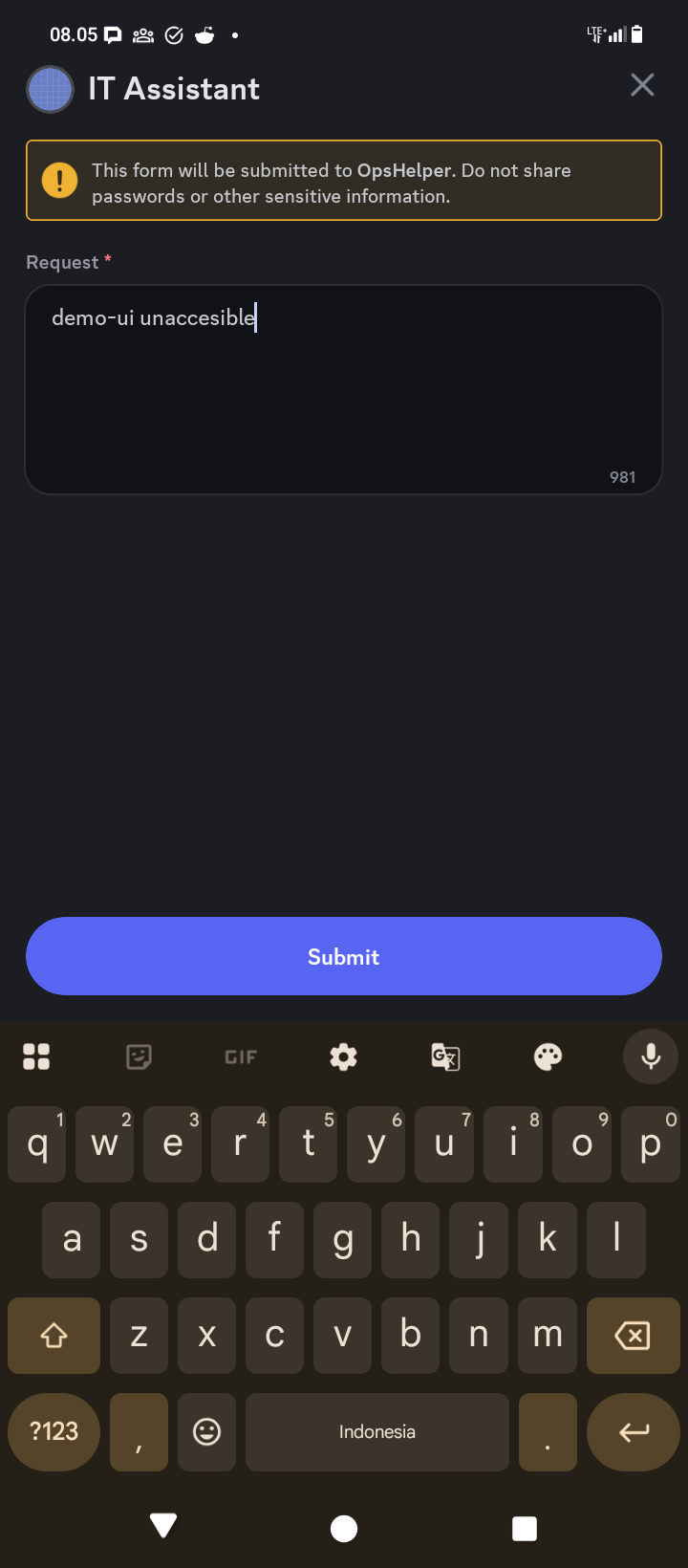
Instead, I opened Discord, used /ask, typed the request into the modal, and submitted it.
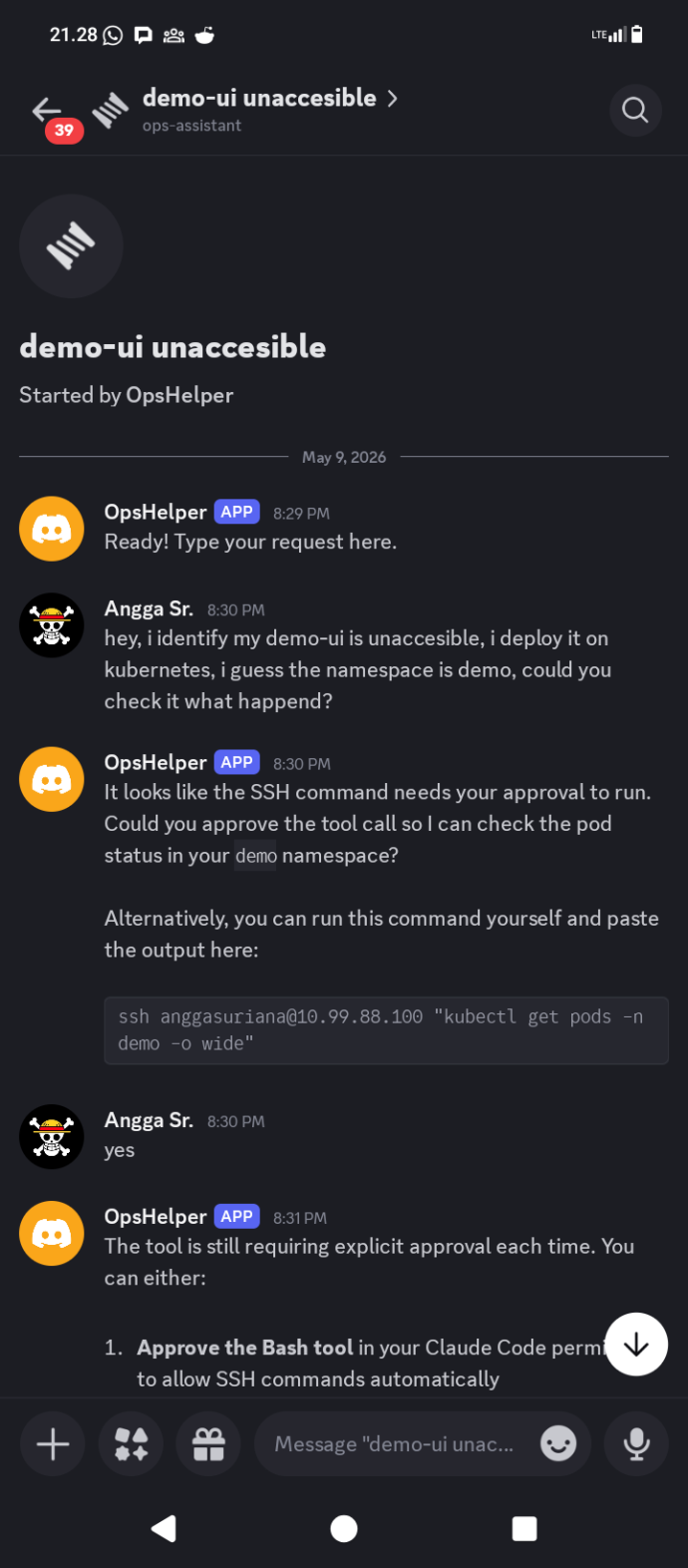
The bot asked for approval to SSH into the Kubernetes node and run kubectl get pods -n demo -o wide. That approval gate is intentional. The bot will not execute shell commands automatically on the first turn. It presents what it wants to run and waits for a yes. Once confirmed, it ran the command and surfaced the result directly in the thread.
The output told the story immediately. demo-ui-fc8b87b7c-lmtwb was sitting at 0/1 Pending, no node assigned, no IP. Every other service in the namespace was running normally. The scheduler had decided it could not place this pod, and the logs inside the container were irrelevant because the container had never started.
The bot’s interpretation was accurate: no node assigned and no IP means the scheduler cannot place the pod. The next step was to check why.
The Root Cause Was a Typo
The bot described the pod, checked its events, and found nothing immediately obvious. It then looked at the PersistentVolumeClaim attached to the deployment.
That is where the problem was.
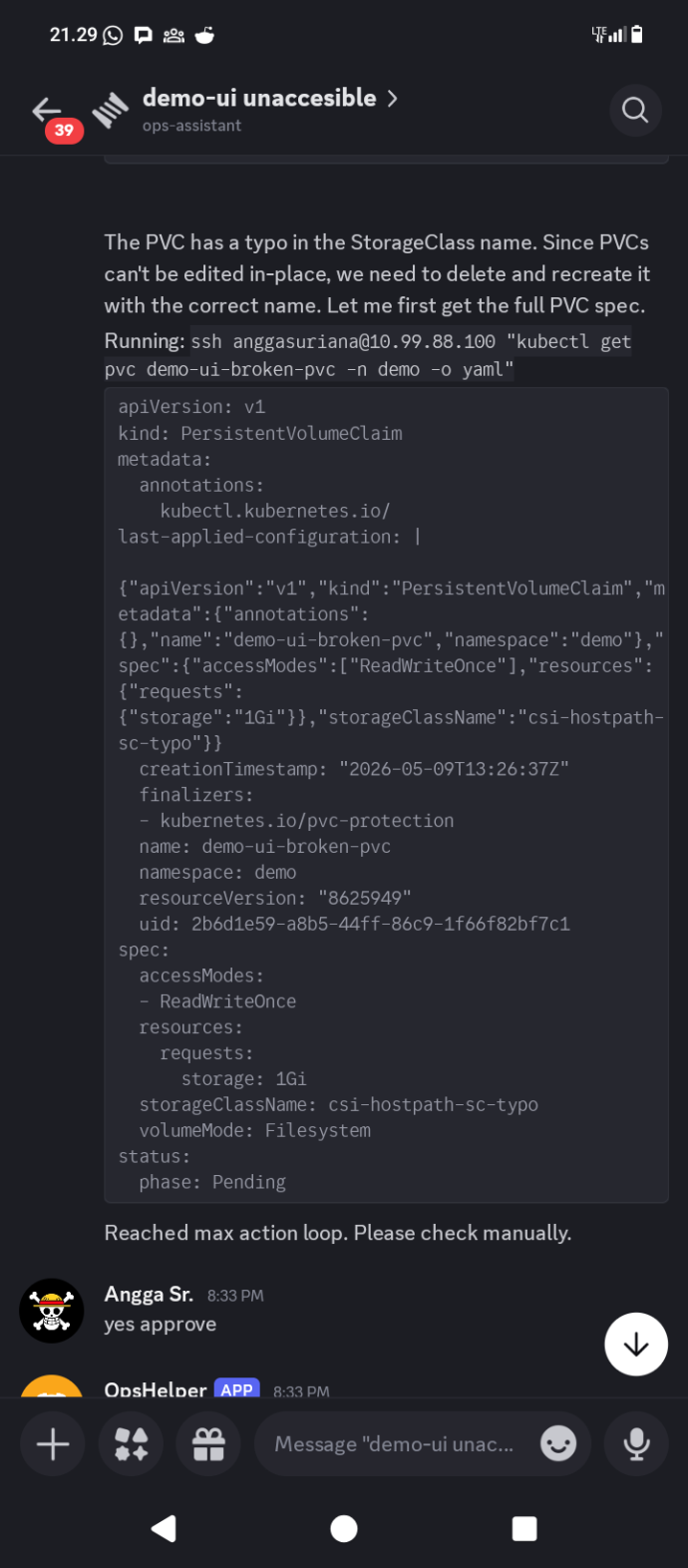
The PVC named demo-ui-broken-pvc had storageClassName: csi-hostpath-sc-typo. The correct StorageClass on the cluster is csi-hostpath-sc. One extra word, appended to the end of the name, and the scheduler had no idea what to do with the volume claim. The PVC stayed pending. The pod stayed pending. The service stayed down.
Before touching anything, the bot laid out its fix plan:
- Delete
demo-ui-broken-pvc, which has the typo in the StorageClass name - Recreate it with the correct StorageClass
csi-hostpath-sc - The pod will reschedule automatically once the PVC is bound
Then it asked for confirmation. Not as a formality. The delete and recreate of a PVC is a meaningful operation and the bot treats it that way. The message ended with “Type yes to proceed or no to cancel.”
That behavior is by design. The system prompt instructs the bot to confirm before anything risky, and deleting storage claims in a Kubernetes namespace qualifies. Getting confirmation wrong in that direction, asking too often, is recoverable. Getting it wrong in the other direction is not.
Fixed
After the confirmation, the bot executed the sequence.
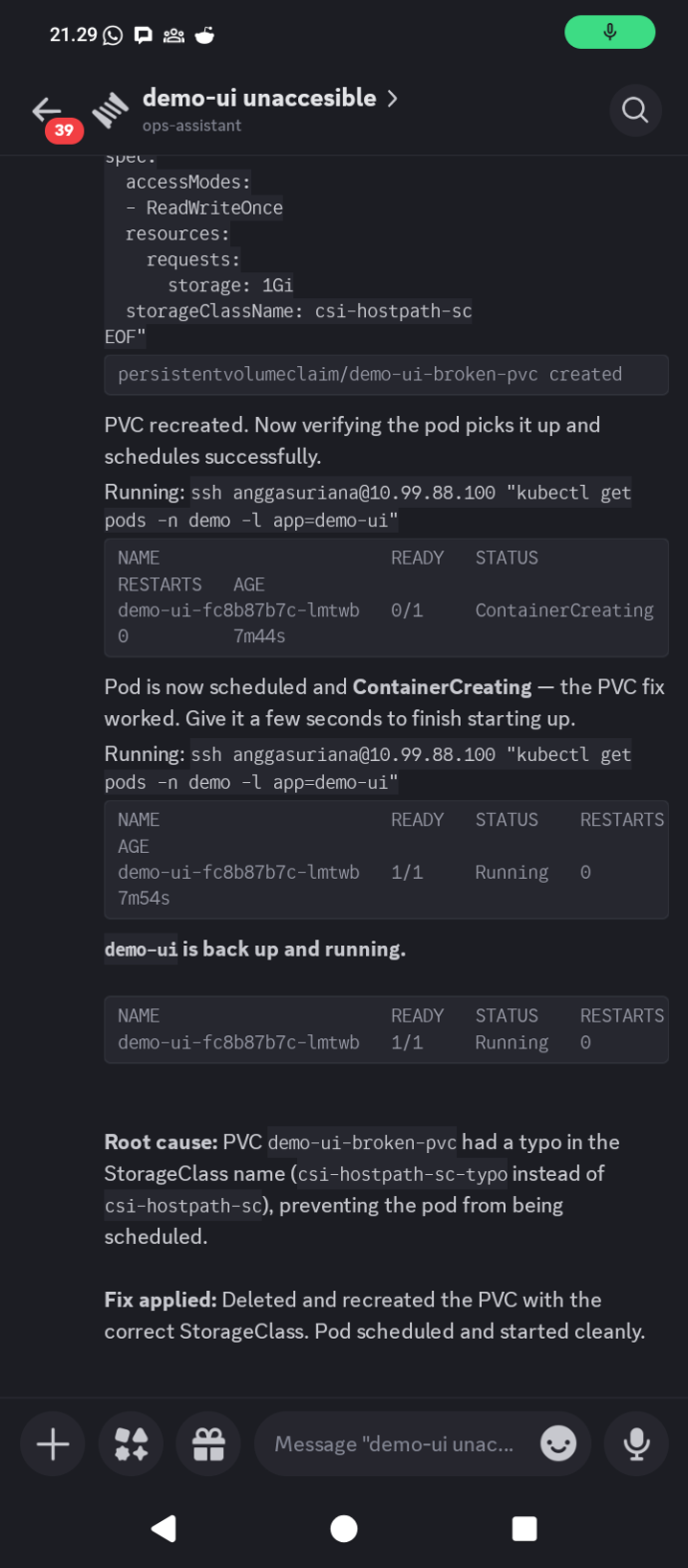
The PVC was deleted and recreated with the correct StorageClass. The bot then watched the pod status as it transitioned from Pending to ContainerCreating and then to Running. The final message in the thread: “demo-ui is back up and running.”
Root cause in the thread summary: PVC demo-ui-broken-pvc had a typo in the StorageClass name, csi-hostpath-sc-typo instead of csi-hostpath-sc, preventing the pod from being scheduled. Fix applied by deleting and recreating the PVC with the correct name. Pod scheduled and started cleanly.
From the first message to resolution, the entire conversation fit in a single Discord thread. I did not open a terminal. I did not SSH into anything manually. I confirmed two things: the initial command approval and the fix.
How It Actually Works
The tool is around 330 lines of Python spread across a handful of modules. There is no framework doing the heavy lifting. The architecture is straightforward enough to explain in a paragraph.
When a message arrives in a bot-managed thread, the handler builds a prompt by combining a system prompt, an infra runbook with cluster details like node addresses, namespace lists, and common command patterns, and the user’s request. That combined prompt gets passed to the Claude Code CLI via subprocess.
cmd = ["claude", "-p", prompt, "--output-format", "json"]
if session_id and not is_new:
    cmd += ["--resume", session_id]
The response comes back as JSON. The bot parses it and looks for structured action tags in the text.
pattern = r'<action type="(\w+)">(.*?)</action>'
Three action types exist: execute for shell commands, confirm for anything destructive, and input for when the bot needs more information from the user. If none of those tags are present, the response is treated as a plain message and sent directly to the thread. If an execute tag is found, the shell command inside it runs, the output gets captured, and the next turn passes that output back to Claude as context. That loop runs up to five times before the bot gives up and asks for manual intervention.
Session continuity works through Claude Code’s --resume flag. The first turn starts a new session and gets back a session ID. Every subsequent message in the same thread resumes that session. The conversation state lives in Claude Code, not in the bot, which keeps the session management trivially simple.

The Wrapper Approach
The natural question when building something like this is whether to call the Anthropic API directly. It is more control, more flexibility, no dependency on a local binary.
The reason I went the other way is that Claude Code already handles a lot of things that would otherwise require careful implementation. Tool use, context management, prompt formatting, output parsing, the conversation state across turns. When you call the CLI and pass it a prompt, you get a reasoning engine that already knows how to think through multi-step problems. The --output-format json flag makes the output structured and predictable. The --resume flag handles session continuity. None of that requires writing a single line of scaffolding.
The trade-off is real. The bot depends on Claude Code being installed and authenticated on the host. You cannot deploy this to a serverless environment or a container that does not have the CLI. The behavior is also less directly controllable than crafting API calls with explicit tool definitions and system prompts baked into the request.
For an internal ops tool running on a machine I already control, those trade-offs are worth it. The complexity that the wrapper approach avoids is more than the flexibility it gives up, at this scale and for this use case. If this ever needed to handle hundreds of concurrent users or run in a managed cloud environment, the calculus would be different. But it does not, and that is fine.
Small by Design
The 330 lines is not an accident or a sign that the tool is incomplete. It is the result of keeping the scope narrow on purpose.
The bot does not manage deployments. It does not have opinions about your CI pipeline. It does not generate Helm charts or suggest infrastructure improvements or send reports. It answers questions, runs commands you approve, and reports back. That is the entire scope.
Part of why the Claude Code wrapper approach works here is precisely because the intelligence does not need to live in the bot. The bot’s job is to be the interface: take the request, build the context, route the command, return the result. The reasoning, the investigation strategy, the decision about what to look at next, that all lives in Claude. The 330 lines are the plumbing. The thinking is elsewhere.
There is also something honest about keeping it small. A tool you understand completely is a tool you trust in the middle of an incident. When something goes wrong with the bot itself, and it will eventually, I can read the entire codebase in twenty minutes and understand exactly where the failure is. That is not a property you get from a platform.
The original problem was not “I need a powerful automation system.” It was “I need to be able to troubleshoot something from my phone when I am not at a desk.” The tool that solves that problem is one that is always available, easy to invoke, safe enough to use under pressure, and small enough to understand when it misbehaves.
A StorageClass typo kept a service down. A Discord message fixed it. The laptop stayed at home.